Performance Under the Hood: Web Workers for Real-Time Processing
How ColorLayer uses Web Workers to offload heavy color computation and image processing to background threads, keeping the UI responsive during complex operations.
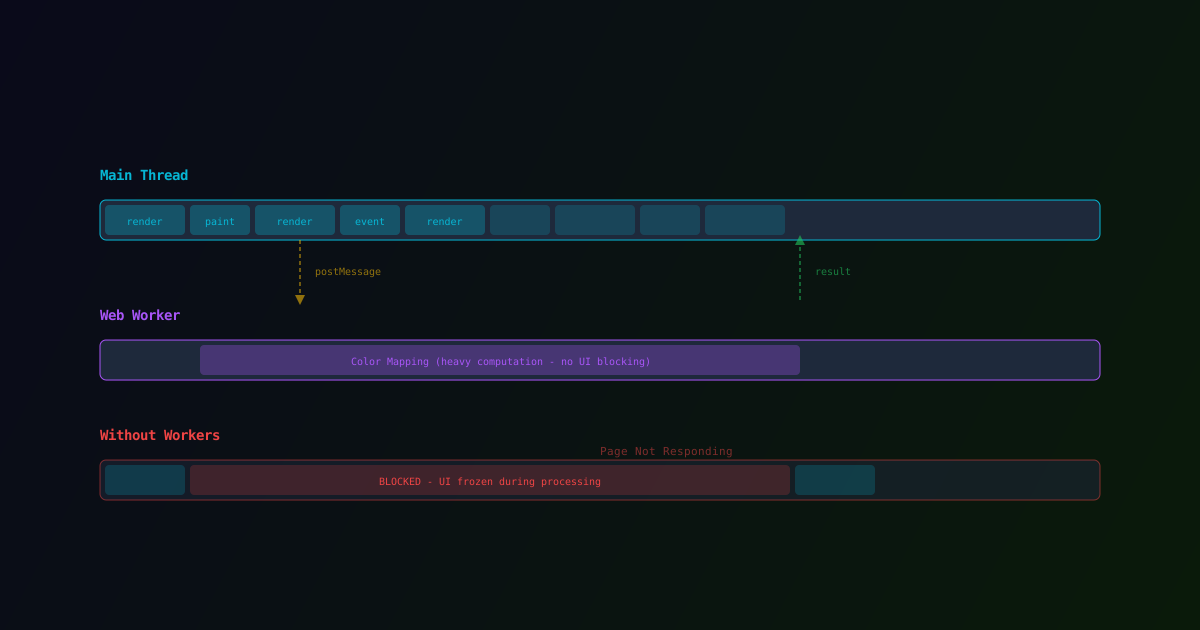
When you adjust a slider in ColorLayer and the 3D preview updates instantly, there is a lot happening behind the scenes. Color mapping, optical simulation, geometry generation — these are computationally expensive operations. On a 500x500 image with 4 filaments and 3 layers, the color mapper evaluates 16 million possible combinations.
Running all that computation on the main thread would freeze the browser. Sliders would stutter, buttons would stop responding, and you might even see the dreaded "Page Not Responding" dialog. We solved this with Web Workers.
What Are Web Workers?
Web Workers are a browser API that lets you run JavaScript in background threads, separate from the main UI thread. The main thread handles rendering, user interaction, and DOM updates. Workers handle computation.
Communication happens via postMessage — the main thread sends data to the worker, the worker processes it, and sends the result back. The main thread never blocks.
Where ColorLayer Uses Workers
Color Mapping
The heaviest operation in ColorLayer is the color mapping step. For each pixel, the algorithm:
- Looks up the target color
- Compares it against all possible filament stack combinations
- Picks the closest match using perceptual color distance (delta-E)
With 4 filaments and 3 layers, there are 64 possible stacks per pixel. For a 500x500 image, that is 250,000 pixels times 64 comparisons = 16 million distance calculations.
Moving this to a Web Worker means the UI stays responsive during the entire computation. You can scroll, adjust other settings, or switch tabs while the color mapping runs.
Background Removal
The ISNet model for background removal also runs in a Web Worker. ONNX Runtime executes the neural network inference in the background, with progress updates sent back to the main thread to update the loading indicator.
3MF Export
Generating the 3MF file involves XML serialization, geometry assembly, and ZIP compression. For large models, this can take several seconds. Running it in the background with async yield points prevents the browser from freezing.
The Worker Pattern
In our codebase, we use a factory pattern for Web Workers. Since each app in our monorepo (maker, bg-tool, svg-tool) needs its own Worker instance (because Worker URLs must be resolved at build time), the shared package exports a factory function:
// Shared package exports the factory
export function createUseBackgroundRemoval(
  workerFactory: () => Worker
) {
  // Returns a React hook that manages the worker lifecycle
}

// Each app creates the Worker with its own URL
const useBackgroundRemoval = createUseBackgroundRemoval(
  () => new Worker(
    new URL("@oloo/bg-removal/worker", import.meta.url),
    { type: "module" }
  )
);
This pattern lets us share the processing logic across apps while letting each app's bundler resolve the Worker URL correctly.
Async Yield Points
For operations that cannot be moved to a Worker (because they need DOM access or state that is not serializable), we use async yield points. The computation is broken into chunks, with await new Promise(resolve => setTimeout(resolve, 0)) inserted periodically to let the browser handle UI events.
This prevents the "not responding" dialog without the overhead of Worker communication for every operation.
Measuring the Impact
Before Web Workers, adjusting the color count slider in the editor caused a 1-3 second UI freeze on medium-sized images. After moving color mapping to a Worker:
- UI responsiveness: Continuous — no frame drops during processing
- Processing time: Same or slightly faster (no GC pressure from main thread)
- User experience: Sliders feel instant, even though processing may still be running
The tradeoff is slightly increased code complexity — Worker communication is asynchronous, so you need to handle loading states and cancellation properly.
What is Next
We are exploring additional performance optimizations:
- WebAssembly for the inner loop of the color distance calculation
- SharedArrayBuffer for zero-copy data transfer between main thread and Worker
- OffscreenCanvas for Worker-side rendering of the 3D preview
See It in Action
Open the ColorLayer editor, upload a large image, and adjust the settings. Notice how the UI never stutters, even as the 3D preview updates with new color calculations. That is Web Workers at work.
Interested in the technical architecture of browser-based 3D printing tools? Follow our blog for more deep dives into the technology behind ColorLayer.
ColorLayer Team
Author