How Multi-Color 3D Printing Works: The Science Behind ColorLayer
Discover the optical principles that make multi-color FDM printing possible, and how ColorLayer uses advanced simulation to achieve accurate color reproduction.
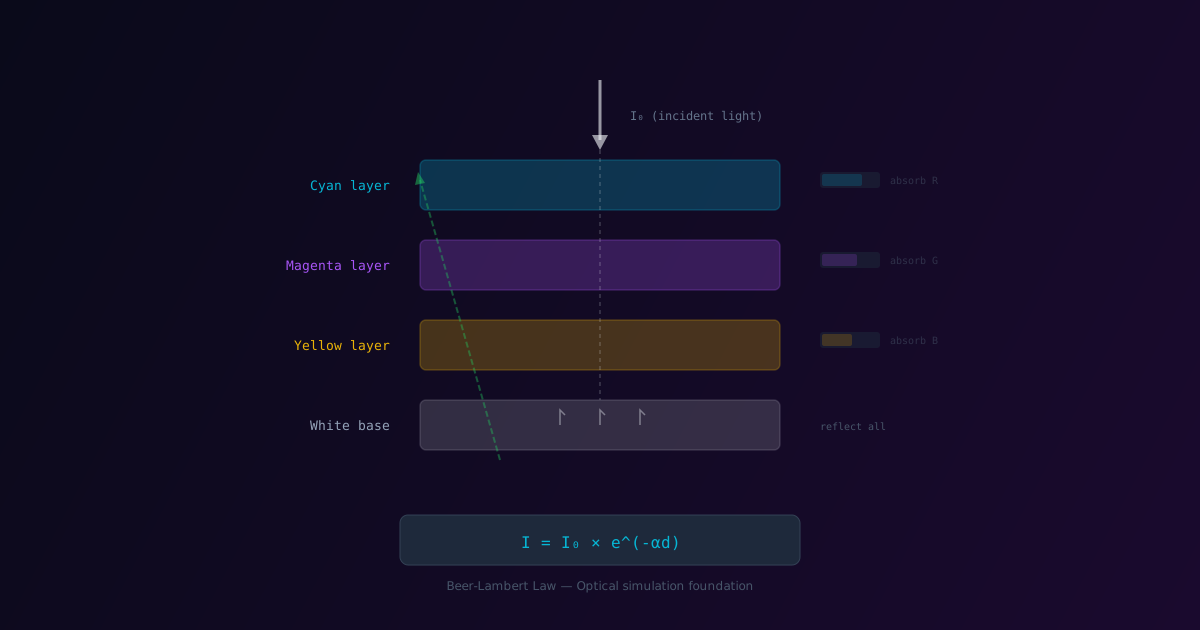
Multi-color 3D printing with FDM printers has traditionally been limited to simple color changes between regions. But what if we could create full-color images by stacking translucent filament layers? This is the principle behind ColorLayer, and understanding the science makes it even more impressive.
The Key Insight: Translucent Layers
Most colored PLA and PETG filaments are not fully opaque - they're translucent. When you stack multiple thin layers of different colored filaments, light passes through each layer and the colors mix subtractively, similar to how colored glass filters work.
This means:
- A thin layer of yellow over cyan creates green
- Red over blue creates purple
- White at the bottom reflects light back through the stack
The Beer-Lambert Law
ColorLayer's optical simulation is based on the Beer-Lambert law, a principle from chemistry and optics that describes how light is absorbed as it passes through a material:
I = I₀ × e^(-αd)
Where:
- I is the transmitted light intensity
- I₀ is the incident light intensity
- α is the absorption coefficient (depends on the material)
- d is the layer thickness
In simpler terms: the thicker the layer and the more absorptive the material, the less light passes through.
From Physics to Pixels
For each pixel in your image, ColorLayer needs to determine which combination of filament layers will produce the closest color match. Here's how it works:
1. Color Space Analysis
First, ColorLayer converts your image colors from RGB to a more perceptually uniform color space (LAB). This ensures that colors that look similar to humans are treated as similar by the algorithm.
2. Building the Color Palette
Given your selected filaments and number of layers, ColorLayer calculates all possible color combinations. For example, with 4 filaments and 3 layers, there are 4³ = 64 possible stacks.
For each stack, it simulates how light would:
- Enter the top layer
- Pass through each layer (absorbing certain wavelengths)
- Reflect off the base
- Pass back through the layers to your eye
3. Optimal Stack Selection
For each pixel in your image, ColorLayer finds the filament stack that produces the closest matching color. This is done using perceptual color distance metrics that account for how humans actually perceive color differences.
The Role of the Base Layer
The base layer is more than structural support - it's optically important too:
- White base: Reflects all light back through the color layers (brightest results)
- Dark base: Absorbs light, making colors appear deeper but darker
- Colored base: Adds a tint to all colors
For most prints, a white base provides the best color gamut and vibrancy.
Why Calibration Matters
In theory, we could calculate exact colors from filament specifications. In practice, several factors cause real-world results to differ:
- Filament variation: Even the same brand/color varies between batches
- Printer settings: Temperature affects color slightly
- Layer height: Thicker layers appear more saturated
- Lighting conditions: The illumination when viewing matters
ColorLayer's calibration system solves this by:
- Printing a test card with all possible color combinations
- Photographing the actual printed colors
- Building a lookup table (LUT) that maps expected → actual colors
- Using this LUT to adjust predictions for your specific setup
After calibration, ColorLayer knows exactly what colors your printer produces with your filaments.
Practical Limitations
Understanding the physics also reveals the limitations:
Color Gamut
The range of achievable colors is limited by your filament selection. You can't create colors brighter than your brightest filament or more saturated than your most saturated filament.
Tip: Include a white, a black, and saturated versions of primary colors (cyan, magenta, yellow or red, green, blue) for the best gamut.
Layer Visibility
With very thin layers (0.08mm or less), the layer lines become nearly invisible. But thicker layers (0.12mm+) may show visible ridges that can affect the appearance.
Print Orientation
- Color-up: Colors face away from the bed. Good for wall art.
- Color-down: Colors face the bed (smooth surface). Better for detailed images but may have adhesion challenges.
The Math in Action
Let's walk through a simplified example. Say we want to reproduce a pixel with RGB value (100, 180, 80) - a medium green.
With filaments: White (W), Cyan (C), Yellow (Y), Magenta (M)
ColorLayer might calculate:
- Stack [W, Y, C] produces RGB (95, 175, 85) - distance: 8.7
- Stack [W, C, Y] produces RGB (90, 185, 90) - distance: 12.3
- Stack [Y, C, W] produces RGB (110, 170, 75) - distance: 15.1
The first stack wins because it has the smallest perceptual distance to our target color.
Multiply this calculation by every pixel in your image (potentially millions), and you get a complete multi-color 3D model.
Continuous Improvement
ColorLayer's simulation engine is constantly being refined. We're working on:
- Better optical models that account for scattering and fluorescence
- Faster algorithms for real-time preview updates
- Expanded printer support beyond Bambu Lab
- Advanced calibration with automated color measurement
Try It Yourself
The best way to understand multi-color printing is to try it:
- Start with a simple image (logo, cartoon character)
- Use 3-4 layers with CMYK or similar filaments
- Enable calibration if you have time
- Compare the printed result to the preview
You'll be amazed at how accurate the color reproduction can be!
Have questions about the science? Found an edge case where the simulation could be improved? We'd love to hear from you - the ColorLayer algorithm improves with community feedback.
ColorLayer Team
Author